The meeting does not become a useful record
A calendar entry tells you who attended. It may not explain why the conversation mattered, which fund or organisation it concerned, or what belongs in the relationship history.
 FutureProof Agents
FOR PRIVATE-FUND INVESTOR RELATIONS TEAMS
The investor meeting happened. The notes are in an inbox, the contact sits under two company names, and the CRM still shows the previous conversation. Before the next meeting, someone has to reconstruct the relationship again.
We implement agentic solutions around your investor-relations workflow: approved interaction capture, contact resolution, a human review queue and controlled CRM updates, with source-linked briefs as an optional module. Built with security in mind, with controlled access and human approval.
A conversation with Yuval about where work gets stuck and what to fix first.
WHO THIS IS FOR
US private equity and venture capital firms with a dedicated investor-relations or investor-services team.
IR leaders, operations managers and CRM owners responsible for keeping investor interactions and relationship records usable.
Teams whose approved calendar, email and meeting information still needs manual classification, contact matching or review before it reaches the CRM.
THE PROBLEM YOU KNOW TOO WELL
The recurring work is deciding what matters, matching the right entities and recording enough context for the next person. That judgment needs clear rules and review, even when the data arrives automatically.
A calendar entry tells you who attended. It may not explain why the conversation mattered, which fund or organisation it concerned, or what belongs in the relationship history.
A new role, subsidiary or duplicate company record can leave staff unsure where to put the interaction. A confident-looking match is not enough when the history could attach to the wrong investor.
Meeting notes, previous conversations and approved research sit in different places. The next brief can miss a recent interaction or repeat an outdated fact unless someone checks the sources.
WHAT COULD CHANGE
A useful CRM record lets the next person understand what happened, which relationship it belongs to and what still needs attention. We connect that record to a reviewed preparation workflow.
Bring approved interaction history and source-backed context into a brief. Measure preparation effort on your team’s own examples.
Keep ambiguous names, incomplete profiles and conflicting facts in a visible review queue instead of silently choosing a match.
Record the source, reviewer and outcome of each approved change. Operations can see unresolved items and failed writes before they become missing history.
AGENTS AT WORK
We implement the agents, connect your tools and shape the work around your team.
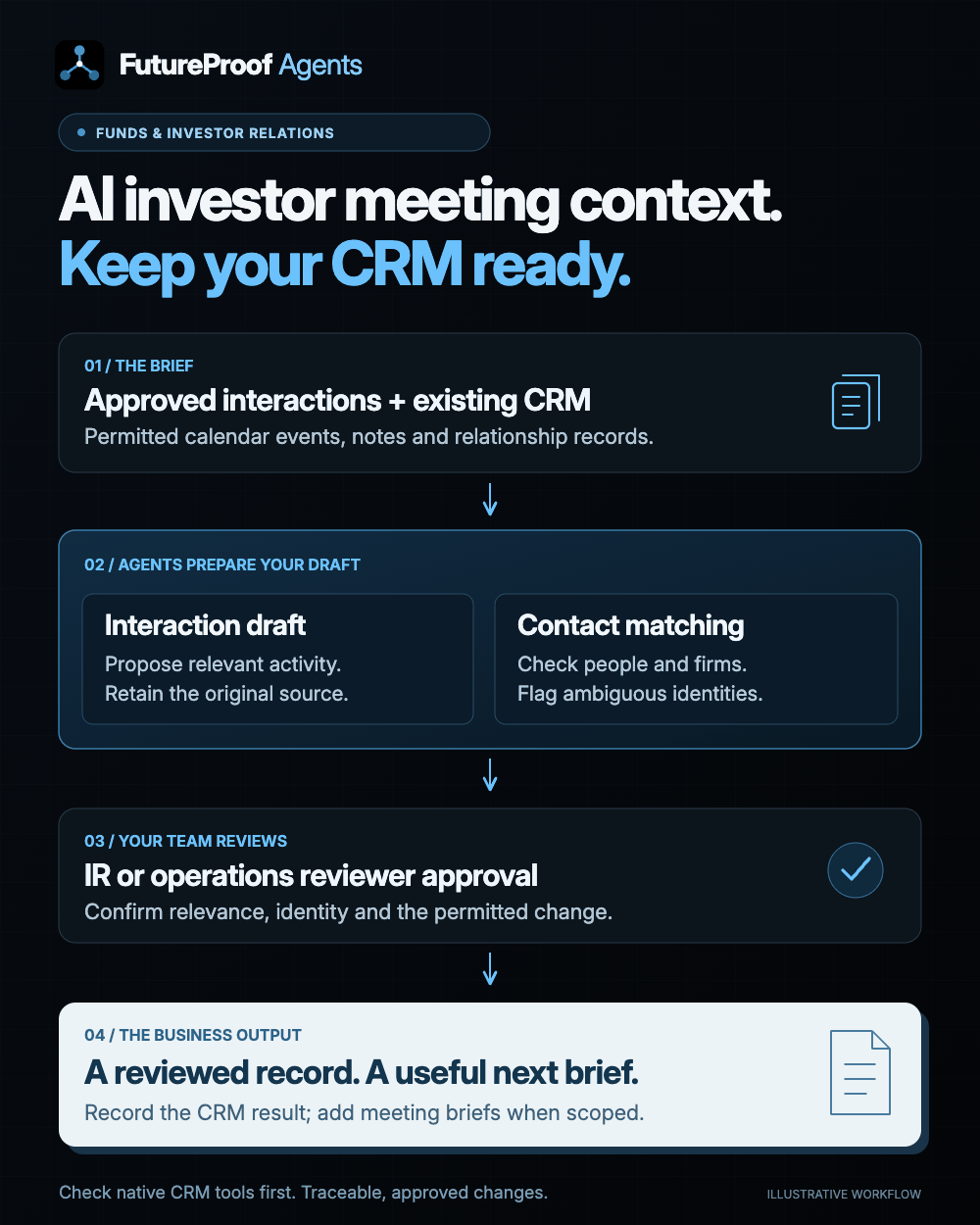
Connect one approved mailbox, calendar or export. Apply the IR team’s rules to propose which interactions belong in the CRM, with a clear reason and the original source beside each decision.
Search existing people, organisations and interactions before proposing a new record. Show possible matches and missing fields; route ambiguous identities and conflicting details to the team.
Give a named reviewer a queue of proposed activities, tags and profile changes. Approved updates use the permitted write path, retain their source and expose failed or duplicate operations for follow-up.
Prepare a concise, editable brief from authorised relationship history and agreed research sources. Cite material facts, flag gaps and separate read-only preparation from any proposed CRM changes.
IMPLEMENTED FOR YOU
An agentic solution built around your business: AI agents that carry out the connected steps, with your team in control of key decisions.
Walk us through one recurring bottleneck. We map the work, the people and the tools, then agree on a useful first implementation.
We configure the agents around your process and connect the CRM, files and communication tools the work depends on.
We test real examples with your team, refine the handoffs and train the people who will use it before rollout.
YOUR CRM. YOUR TOOLS.
We begin with the CRM and Microsoft or Google tools you already use. Review native capture and reporting features first, then scope any remaining gap in classification, entity matching, review or handoff. Backstop and Outlook are examples to assess, not a claim that a custom build is always needed.
 Outlook
 Google Drive
 Salesforce
 HubSpot
Examples of tools we can connect. We confirm your software, access and required actions during mapping. Using something else? Tell us your setup.
A FOCUSED FIRST STEP
Your IR lead and CRM owner choose a bounded sample, including ambiguous contacts and irrelevant meetings. We compare the native workflow with the remaining manual work, agree review rules and test the complete source-to-record path before expanding.
Discuss your IR workflowValidate one interaction type, reviewer and write path first. Agree rollout timing after access checks and pilot results; profile enrichment and briefing modules can follow as separately scoped work.

YOUR IMPLEMENTATION PARTNER
I’m Yuval Keshtcher, founder of FutureProof Agents. We connect process mapping, AI development and your existing tools in one scoped project, from the first workflow conversation through testing and handover.
Meet FutureProof AgentsBEFORE WE START
That is the first thing to check. Native CRM and Outlook features may already solve the problem. A custom workflow is worth discussing when an agreed gap remains, such as your relevance rules, ambiguous entities, approved historical imports or a handoff that existing configuration does not cover.
The pilot uses a named reviewer and explicit approval before writes. Any later automation needs separately agreed categories, permissions and validation. Ambiguous records remain visible for review; they are not silently merged.
Yes. A read-only briefing pilot can be the first module when preparation is the priority. We agree the source set and output, show citations and missing information, and scope CRM write-back separately.
An approved historical date range can be a separate, bounded batch. We reconcile inputs and outputs, check duplicates and test recovery before extending the period. A historical import is not assumed to be part of the first ongoing workflow.
The workflow prepares operational records and meeting context for your team. Investment judgments, fundraising strategy and investor communications remain with authorised people. No investment or fundraising result is promised.
An IR process owner, a CRM administrator and a few representative examples of the manual handoff. Describe the source and required output first; share sensitive investor information only through an agreed access process.
LET’S LOOK AT YOUR BOTTLENECK
Walk through one approved interaction with Yuval, from the calendar or notes to the CRM and the next meeting brief. We’ll identify a useful first workflow and check whether your current tools already cover it.
A brief description is enough. Please keep confidential client records and passwords out of the form.
YOUR INQUIRY IS IN
Your details have been received. We’ll use them to prepare for the conversation and reply at the email you provided.
Choose a call timeThis inquiry does not subscribe you to marketing emails.
FutureProof Agents uses your business and contact details to assess and respond to this inquiry. We store your submission in our private lead database, CRM lead inbox and a private Google spreadsheet, and send an internal email alert to our team. We keep the page, project interest, referral and campaign information supplied in the link so we can understand which outreach or campaign led to the inquiry. First and latest referral details are kept in browser session storage. A hashed network identifier helps prevent spam. Optional Google Analytics measures page and button activity and successful inquiries; your contact details, prospect reference and form answers are not sent to Google. Declining analytics does not prevent submitting this form. This inquiry does not add you to a mailing list. For access, correction or deletion requests, contact y@uxwritinghub.com.