Every customer writes the order differently
One buyer uses your SKU. Another uses its own item code or orders by the case. Staff need to translate the request into the fields your system expects.
 FutureProof Agents
FOR DISTRIBUTORS AND WHOLESALERS
A customer sends a purchase order. Your team still has to match the account, find the right item codes, check pack sizes and retype the lines. While the order waits for entry, the next email lands in the same inbox.
We implement agentic solutions around your existing order-entry tools, from the incoming purchase order to a checked ERP draft and approved next step. Built with security in mind, with controlled access and human approval.
A conversation with Yuval about where work gets stuck and what to fix first.
WHO THIS IS FOR
You run a US specialty distributor or wholesaler with repeat B2B customers and a working ERP.
You are the owner, operations leader or order-desk manager responsible for getting accurate orders ready for fulfilment.
Your team still handles a repeatable gap between incoming customer orders and the ERP, after the native import or EDI tools have done what they can.
THE PROBLEM YOU KNOW TOO WELL
A purchase order is only useful when its details match the way your business sells, ships and records products. That translation work is where routine orders can slow down.
One buyer uses your SKU. Another uses its own item code or orders by the case. Staff need to translate the request into the fields your system expects.
Details are copied from an email, PDF or approved customer portal into the ERP. The work grows with the number of lines, even when the customer and products are familiar.
A changed delivery address, an unclear unit or a repeated PO number needs attention. Your team needs to see that issue before the order moves forward.
WHAT COULD CHANGE
Give your order desk a prepared draft and a clear list of decisions. Staff can spend their attention on the lines that need judgment while routine information is assembled from the source.
Measure how much time staff spend preparing and correcting each order before and after the pilot. Use that result to decide which formats are worth adding.
Make changed addresses, unclear units, missing item matches and possible duplicates visible during review, with the original request beside them.
Keep received, awaiting-review, exception and ERP-recorded states visible to the team. A failed import should have an owner and a next action.
AGENTS AT WORK
We implement the agents, connect your tools and shape the work around your team.
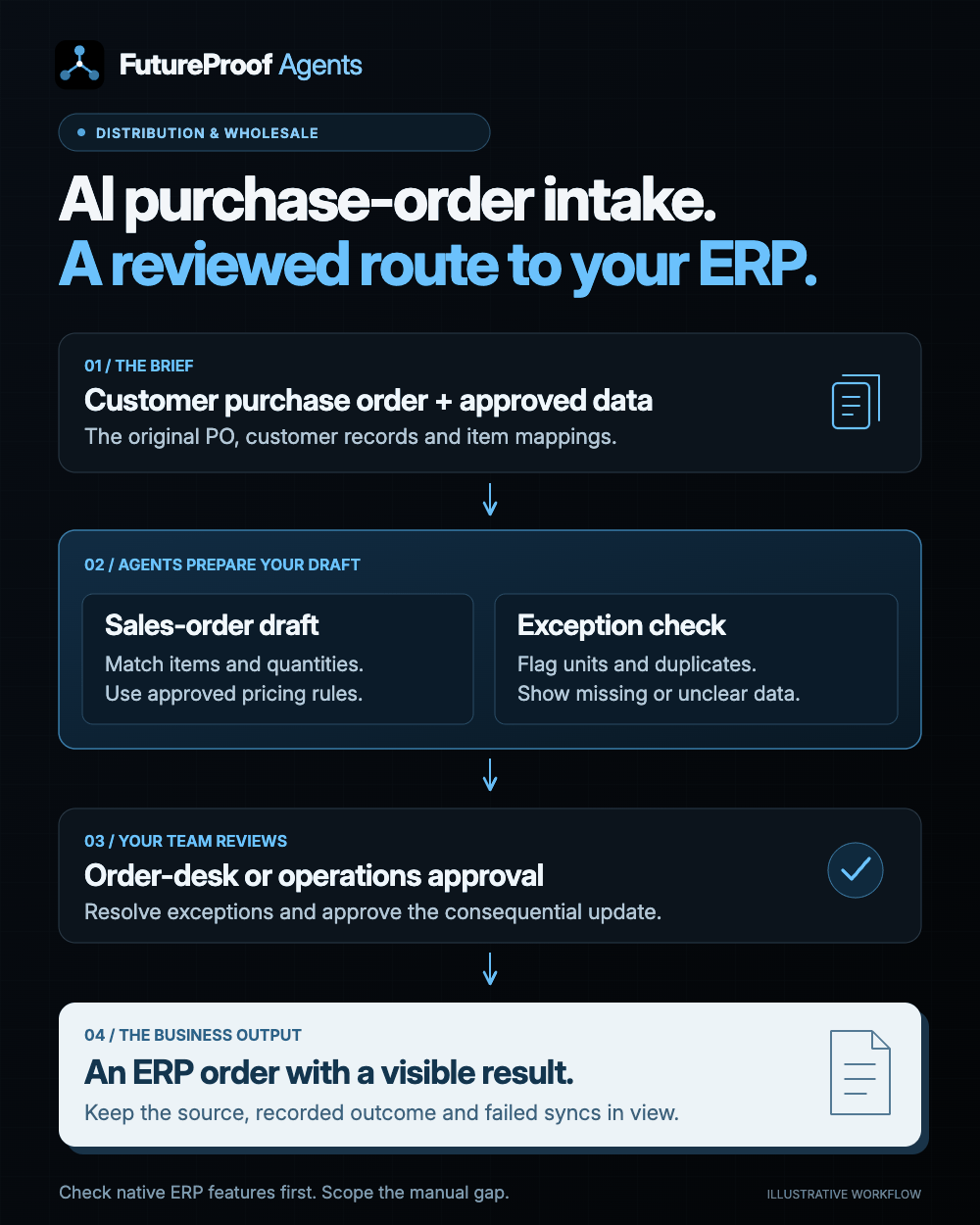
Connect the agreed inbox, file source or supported B2B feed. Keep the original purchase order linked to the work so staff can check what the customer actually requested.
Prepare the customer, ship-to location, item, quantity, unit, price and currency using your approved records and mappings. Flag missing matches and conflicting terms rather than inventing a value.
Show the source beside the proposed fields. Highlight possible duplicates, item or pack-size ambiguity and pricing exceptions. An authorised team member approves the order draft or returns it for clarification.
Use the supported API or approved import route to create the agreed draft or approved order. Record the outcome, preserve its source and show failures or retries clearly so the same order is not silently created twice.
IMPLEMENTED FOR YOU
An agentic solution built around your business: AI agents that carry out the connected steps, with your team in control of key decisions.
Walk us through one recurring bottleneck. We map the work, the people and the tools, then agree on a useful first implementation.
We configure the agents around your process and connect the CRM, files and communication tools the work depends on.
We test real examples with your team, refine the handoffs and train the people who will use it before rollout.
YOUR CRM. YOUR TOOLS.
Your ERP remains the order system of record. We review its existing import, document-capture and EDI functions first, then connect the sources or checks that still require manual work.
 Outlook
 Gmail
Gmail Google Drive
Examples of tools we can connect. We confirm your software, access and required actions during mapping. Using something else? Tell us your setup.
A FOCUSED FIRST STEP
Choose a recurring order type that still needs manual handling. We review the native ERP options, map the remaining gap and agree what an acceptable draft looks like. Test ordinary orders, changes, duplicates and missing information before enabling live writes.
Talk about your order intakeStart in draft or simulation mode. Compare staff handling time, corrections and exceptions on real examples, then enable the agreed ERP writes once the acceptance checks pass.

YOUR IMPLEMENTATION PARTNER
I’m Yuval Keshtcher, founder of FutureProof Agents. We connect process mapping, AI development and your existing tools in one scoped project, from the first workflow conversation through testing and handover.
Meet FutureProof AgentsBEFORE WE START
Distributors and wholesalers with recurring B2B orders, an order desk and a specific manual gap between customer requests and their ERP. We confirm the order volume and handling process before recommending a build.
We check that first. Native document capture, EDI or order-import features may cover the need. We implement only an agreed remaining gap, such as customer-specific item mapping, an unsupported source or exception handling.
The starting point is your existing ERP and approved records. We map the supported integration or import route, implement the agreed workflow and train the people who operate it.
It prepares fields using your approved rules and data. Unclear prices, product substitutions, unit conversions and other consequential changes go to the named reviewer under the approval policy you agree.
We measure that on your sample orders. Order formats, data quality, review rules and ERP access determine the result. We agree the rollout and acceptance checks after mapping; there is no blanket speed or accuracy guarantee.
LET’S LOOK AT YOUR BOTTLENECK
Walk through one recurring order type with Yuval: where it arrives, what staff change and how it reaches the ERP. We’ll identify the smallest useful implementation. Please keep customer order details out of the enquiry form.
A brief description is enough. Please keep confidential client records and passwords out of the form.
YOUR INQUIRY IS IN
Your details have been received. We’ll use them to prepare for the conversation and reply at the email you provided.
Choose a call timeThis inquiry does not subscribe you to marketing emails.
FutureProof Agents uses your business and contact details to assess and respond to this inquiry. We store your submission in our private lead database, CRM lead inbox and a private Google spreadsheet, and send an internal email alert to our team. We keep the page, project interest, referral and campaign information supplied in the link so we can understand which outreach or campaign led to the inquiry. First and latest referral details are kept in browser session storage. A hashed network identifier helps prevent spam. Optional Google Analytics measures page and button activity and successful inquiries; your contact details, prospect reference and form answers are not sent to Google. Declining analytics does not prevent submitting this form. This inquiry does not add you to a mailing list. For access, correction or deletion requests, contact y@uxwritinghub.com.